Developing products using cocoa butter replacers means navigating a path of compromises, as many solutions fall short of delivering a true chocolate-like experience. This impacts production efficiency, health commitments, and sensory profiles.
The road of constrains with Cocoa Butter Replacers
Road of Constrains
Crystallization time
High-SAFA options
Sub-optimal meltdown
When opting for a compound low in SAFA, crystallization time typically slows, which can impact production efficiency and limit the potential output of a product.
Most non-hydrogenated or non-trans compounds negatively impact a product’s meltdown properties, affecting the overall sensory experience for end consumers.
Choosing compounds with faster crystallization can boost production efficiency, but often at the cost of health benefits, as many cocoa butter replacers are high in lauric and saturated fats.
High-SAFA options
Sub-optimal meltdown
Crystallization time

Finally, a chocolate-like experience!


Better Performance
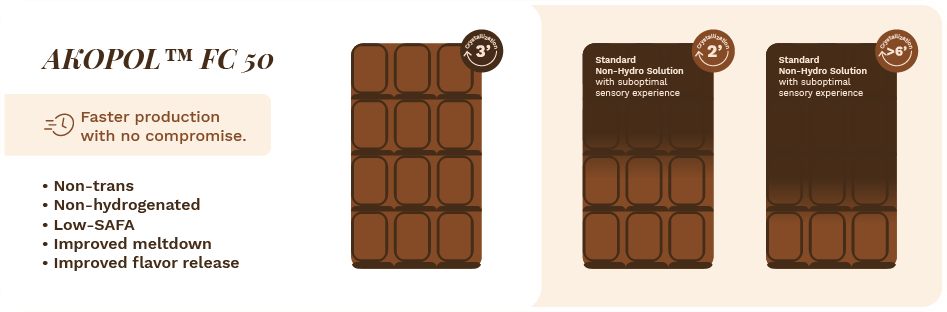
Enable a maximal output of your production with a faster crystallization.
Better Experience
Elevated sensory experience with improved meltdown and flavor release.
Better Health
Commitment to health & wellness with a non-hydrogenated, low-SAFA compound.


Road of Constrains
AKOPOL™ FC 50
Benefits

Pin objects or group of objects to a specific point in the viewport like this navigation menu.
Select one or more object in the layers panel. Ensure these objects exist above the fold. Next, toggle on the pin icon next to the X and Y position in the Design tab of the Inspector Panel.
Note: Pinned objects do not currently work on full-height embedded experiences; only standalone experience and scrolling embedded experiences.
Create an engaging and interactive media kit for your business or product.
Template - Media Kit
1280px x 2360px

By default when you upload a video to Ceros, the player controls will appear for the user, requiring them to interact with the video in order to play. However, in addition to this default video behavior, you can also set your videos to automatically play on load — which requires no input from the user.
To access the autoplay settings, click on a video and you’ll see your video settings populate in the Design tab.
The Show Target(s) & Hide Others interaction enables you to create an interaction that, upon click, will only show an asset (image, video, group, or folder) that you designate, while simultaneously hiding everything else in that folder or group.
Tip: Try adding a delay to animations.
Animations will only be triggered when the object is visible on the screen. By applying a delay you are saying, when the object is on screen, delay animation by x seconds. A delay of 0 will automatically trigger the animation.



AKOPOL™ FC 50
Faster crystallization without compromise
Crafted to deliver a low-SAFA, rapid crystallization and optimal meltdown

In the rapidly changing environment of chocolate and confectionery, we collaborate with our customers to create superior experiences, promote health, enhance performance, and build a sustainable future for both people and the planet. Our innovative plant-based oils and fat solutions help our customers stay ahead of shifting consumer demands.
This is how we make better confectionery happen
Co-develop with us
Contact our AAK experts and find out more about �AKOPOL™ FC 50
Hannah Solati
Senior Research Scientific CCF
hannah.simonsen@aak.com
Pankaj Kumar
Global Business Development Manager CCF
pankaj.kumar@aak.com
Virginia Mellado
Global Marketing Manager
CCF & Bakery
virginia.mellado@aak.com

Anne Brødsgaard
Global Portfolio Manager CCF & Bakery
anne.brodsgaard@aak.com